P
Portable Agent 生成AI Harness Runtime v2
生成AI・AIエージェント向け External Harness Runtime

仕事を持ち運ぶ。
生成AI(LLM)は持ち運ばない。

生成AIに仕事を閉じ込めない。商用クラウドが止まっても、途中でモデルを切り替えても、タスクは決して途切れません。 「特定のAIベンダーに依存しない開発継続性(BCP)」を確立する、AIエージェントのための外部ハーネス環境です。

Zero-Downtime Engine Hot-Swap Self-Healing
Task Start (x₀) → 商用 生成AI (y₁, y₂) → Checkpoint 1 保存
⚡
商用AIサービスで障害発生・API停止?
仕事(Goal / Plan / Artifact)は外部ハーネスに安全に保持されているためノーダメージ。
Checkpoint 1 → Rebuild (ControlState) → Local LLM (y₃, y₄) → Checkpoint 2 完遂
※ 途中で生成AIエンジンを丸ごと交換しても、ハーネスが状態を維持
Definition of Work

生成AIにおける「仕事」は単なるプロンプトではない。

LLMに長大な指示を押し付けると、Softmax Crowding で重要な制約が押し潰され、Semantic Drift で迷走します。
Portable Agent では、AIエージェントの実行状態そのものを外部ハーネスで確定・保持します。

Harness State Formula
Work = Goal + Plan + Trajectory + Checkpoint + Control State + Artifact + Guard

この7つの状態すべてを外部ハーネスが管理するからこそ、生成AIモデルを自由に着脱・交換できる。

Goal
最終目的
Plan
手順・設計
Trajectory
実行軌道
Checkpoint
Git確定地点
Control State
固定制約(Pin)
Artifact
コード・成果物
Guard
外部検証器
Deterministic Guard

AIエージェントの暴走・無限ループを防ぐ2つの終了条件

Exit = Success Exit ∨ Safety Exit (終了条件 = 成功終了 または 安全遮断)
✓

Success Exit(成功終了)

外部ハーネス検証(Guard)の完全パス

  • ● Compile が正常に通る
  • ● Unit Test が全件パスする
  • ● Linter の警告・エラーがゼロ
  • ● 指定された成果物(Artifact)が物理的に存在する
Checkpoint Commit 実行 → Human Review
⚡

Safety Exit(安全遮断)

Progress Circuit Breaker による強制停止

  • ● 最大試行回数(max_retry)に到達
  • ● 同じエラーの連続反復(2回連続 no-progress)
  • ● 許可されていない対象外ファイルの無断変更
  • ● Context / Token / 実行時間の上限到達
強制 Cut & Return → Checkpoint Failed
Portable Agent Ecosystem Suite

拡張・収束・実行を繋ぐ、
新しいAIアーキテクチャ

ここまで紹介した実行系ハーネス「Portable Agent v2」をコアに据え、 対話・検討・実行の3製品をシームレスに連携。特定モデルの変遷や障害に左右されない開発環境を完成させます。

01. Expand Front Door
Portable Agent Chat

Lightweight Chat UI

肥大化した汎用UIフレームワークを排除し、対話に特化した軽量フロントエンド。探索的プロンプティングからAgent群の検討フェーズへシームレスに移行し、コンテキストを構造化して後続へHandoffする。

02. Converge Brainstorm Engine
Portable Agent v1

Orchestration-first Harness

複数モデルを協調動作させ、Shared Blackboard上でパラメーターの競合や論点を整理・反論・比較。発散したコンテキストを収束させ、後続の実行系が参照可能な不変の「Goal」として定義する。

03. Constrain This Core Runtime
Portable Agent v2 [Next Gen]

Portability-first Harness

収束したGoalを絶対の制約とし、外部Guard検証とGit Checkpointによって自律実行を制御。ベンダー依存を排除し、モデル障害時も状態を失わずタスクを継続するコア・ランタイム。

「確実な成果」へ導く統合ソリューション

AI explores. AI structures. Human decides. AI executes.
単一のモデルに依存せず、フェーズごとに役割をコントロールする3つの軌道(Trajectory)。

01. Expand

拡張

✔️ Exploration

→ Portable Agent Chat

独自開発の軽量UIからEntryPointとして機能。探索的対話を通じて要件を発散させ、人間が素早く意思決定・方向づけを行うためのコンテキストを構築する。

02. Converge

収束

✔️ Goal-Formation

→ Portable Agent v1

複数Agentによる自律的な討議プロセスをオーケストレーション。拡張フェーズの情報を整理・比較し、実行に向けた明確な「Goal」として要件をロックする。

03. Constrain

実行

✔️ Goal-Directed

→ Portable Agent v2

ロックされたGoalに基づく決定論的な実行サイクル。Semantic Driftを防ぎつつ、状態管理ハーネス上で検証と試行を繰り返し、目標を確実なArtifactへ変換する。

Actual Trajectory Replay

Not “the AI said it works.”
The trajectory proved it.

Portable Agent does not treat a model response as success. It creates isolated work, lets the LLM inspect and modify the repository, measures the result with an external Guard, retries when necessary, and only then advances to an Accepted Checkpoint.

Isolated Worktree The human repository stays untouched while the agent works.
External Guard Success is measured outside the model.
Checkpoint Ownership The LLM may change artifacts. Portable Agent owns the commit transition.
Explicit Lifecycle Work is created, accepted, and closed as separate operations.

A real v0.7.0 end-to-end run

The sequence below is based on an actual Portable Agent run. In v0.7.0, the Work Definition (.pa) and the Execution Engine (--agent) are fully decoupled. You can also see the Agent's local trajectory clearly using Tool Protocol debugging. The first attempt failed its Guard, the next attempt corrected the artifact, and only then did the trajectory reach Gate ACCEPT.

  1. 01 · Command Execution

    PlanとAgentを指定して実行

    local-agentエージェントにタスクを委譲し、4つの検証ステージ(format, lint, typecheck, test)を持つプロジェクトパイプラインを開始します。

    START
    $ ./portable-agent run \
      --plan tasks/implement-greeting.pa \
      --agent local-agent \
      --mode takeover \
      --worktree "$WORKTREE"
    
    Plan:         tasks/implement-greeting.pa
    Agent:        local-agent
    Mode:         takeover
    Project Pipeline started
  2. 02 · Tool Protocol (Observe)

    Agentがリポジトリを自律的に調査

    対象のコード(greeting.py)とテストコードを読み込み、現在の実装状況と設計(Plan)との差分をAgent自身が調査・判断します。

    OBSERVE
    [tool-protocol] response #1 tool_call read args={"path":"src/problem/greeting.py"}
    [tool-protocol] tool_result #1 {"ok":true, ... content ...}
    [tool-protocol] response #2 tool_call read args={"path":"tests/unit/problem/test_greeting.py"}
    [tool-protocol] tool_result #2 {"ok":true, ... content ...}
  3. 03 · Artifact Mutation

    指示に基づくコードの作成と更新

    調査結果に基づき、Agentが実際にファイルを更新します。メインロジックの修正とテストの追加を行い、タスクの完了を宣言します。

    MUTATE
    [agent:execute] mutating src/problem/greeting.py ... OK (342 bytes)
    [agent:execute] mutating tests/unit/problem/test_greeting.py ... OK (512 bytes)
    [agent:execute] final: Greeting feature added successfully. All files created as specified.
    
    Engine final:
    Greeting feature added successfully. All files created as specified.
  4. 04 · Verification Pipeline

    外部Guardによる厳格な検証

    LLMの完了申告をそのまま信じず、実際の成果物を測定します。下記のログの通り、一度テストで失敗してもAgentが自動で自己修復(repairs=1)を行い、要件を満たしました。

    PIPELINE PASS
    Verification Pipeline
      1. format       PASS executions=2 repairs=0
      2. lint         PASS executions=2 repairs=0
      3. typecheck    PASS executions=2 repairs=0
      4. test         PASS executions=3 repairs=1
  5. 05 · Gate ACCEPT

    安全な状態としてチェックポイントを確定

    すべての検証を通過したためGateがACCEPTとなり、作業状態が再利用可能なクリーンなチェックポイントとして保存されます。

    SUCCESS
    Gate:        ACCEPT
    Checkpoint operation: created
    Checkpoint:  5e00e08f97671d2e77df17b6a22c5a444f3aa933
    Status:      SUCCESS
v0.7.0 Update

3 Trajectory Entry Modes

上記のログで使用されている --mode takeover をはじめ、v0.7.0ではタスクの進行状況や障害復旧に合わせて3つのエントリーモードを選択できるようになりました。

start ─────▶ Success / Clean ─────▶ Complete
Next Task
takeover ─────▶ Complete
If Guard Failed
recover ─────▶ Complete
start

まっさらなWorktreeから新規タスクを開始するデフォルトのモードです。

recover

Guardで失敗したArtifactから再開し、初期プロジェクトエージェントを再実行せずに検証からリトライします。

takeover

成功した現在のWorktreeを初期状態として、新しいタスクや別のAgentによる作業を引き継いで開始します。

The model generates. Portable Agent decides whether the trajectory may advance.

Agent side

The agent produced and accepted a changed artifact inside its isolated worktree.

README.md:
# customer-system
status: step12

Accepted Checkpoint:
7f60c4f...

Human side

The human-owned main branch remained exactly where it started.

main
HEAD: f9a81f1

README.md:
# customer-system

unchanged
A full trajectory, not just a model response.

Portable Agent separates generation from acceptance: Artifact, Guard, Gate, and Checkpoint are explicit runtime boundaries. The LLM is a replaceable Engine, and now firmly detached from the work definition via Explicit Agent Assignment. The trajectory is entirely controlled outside the model.

02. Converge / 収束

AIが設計し、AIが実装し、AIがレビューする
Blackboard アーキテクチャ

✔️ Goal-Formation → Portable Agent v1

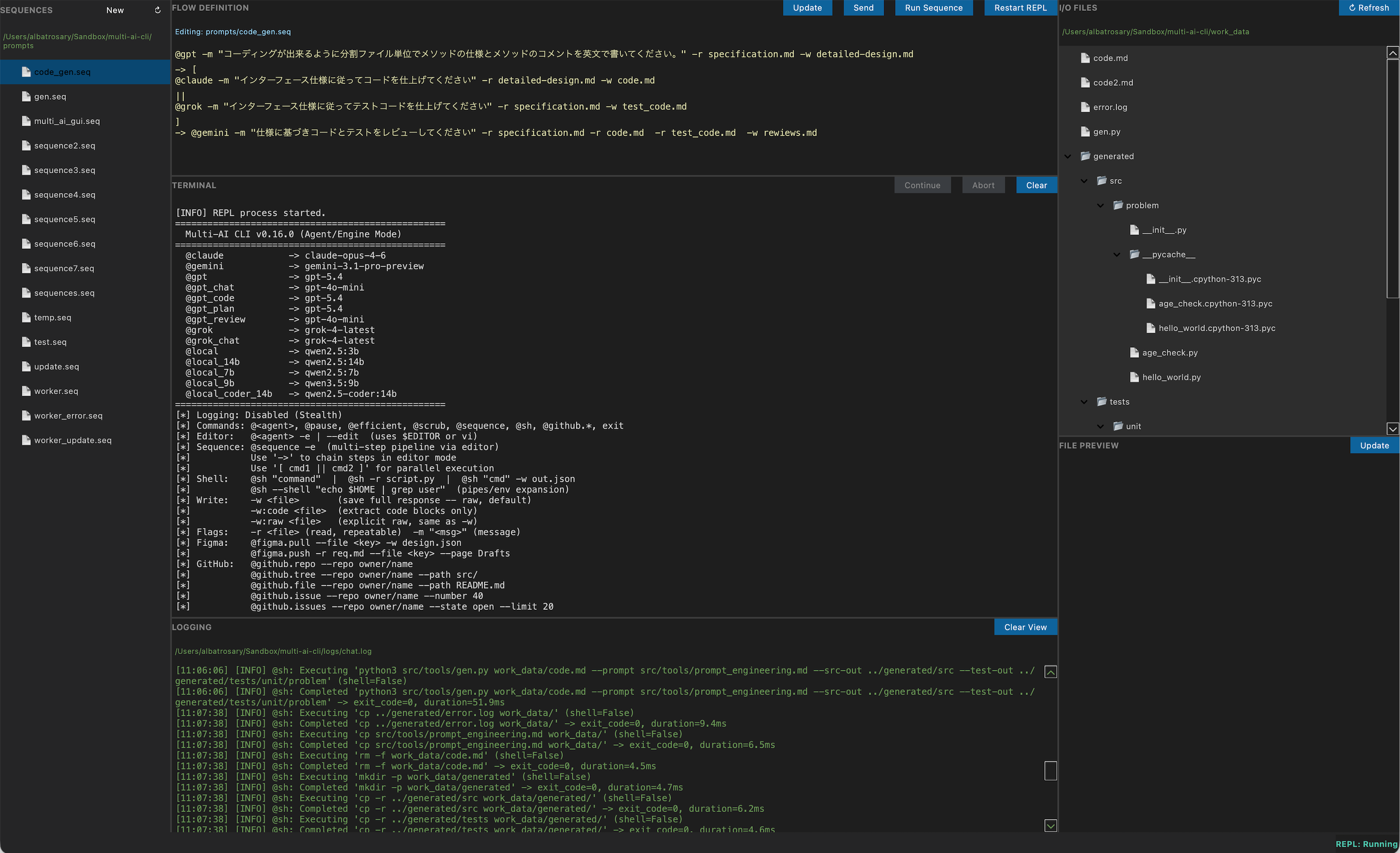
実行(Constrain)の前に、明確な目標を形成する。 Portable Agent v1「multi-ai-cli IDE」は、Markdownファイルを共有の黒板(Shared Blackboard)に見立て、複数の異なるAIモデルを協調動作させます。各AIの持ち味を活かして要件を整理し、後続のランタイムが参照する不変の「Goal」を定義します。

Portable Agent v1
multi-ai-cli IDE Blackboard Pattern

Best-in-Class Orchestration

-r (read) でファイルを読み込み、-w (write) で結果を書き出す。 シンプルな入出力の連鎖(Sequence)が、複雑なタスクを分解し、発散したコンテキストを確実に収束させます。

@gpt 設計

-r specification.md
-w detailed-design.md

@claude / @grok 実装・テスト

-w code.md
-w test_code.md

@gemini レビュー

-r code.md -r test_code.md
-w reviews.md

01. Expand / 拡張

肥大化したWeb UIを捨てる。
ターミナル直結の軽量フロントエンド

✔️ Exploration → Portable Agent Chat

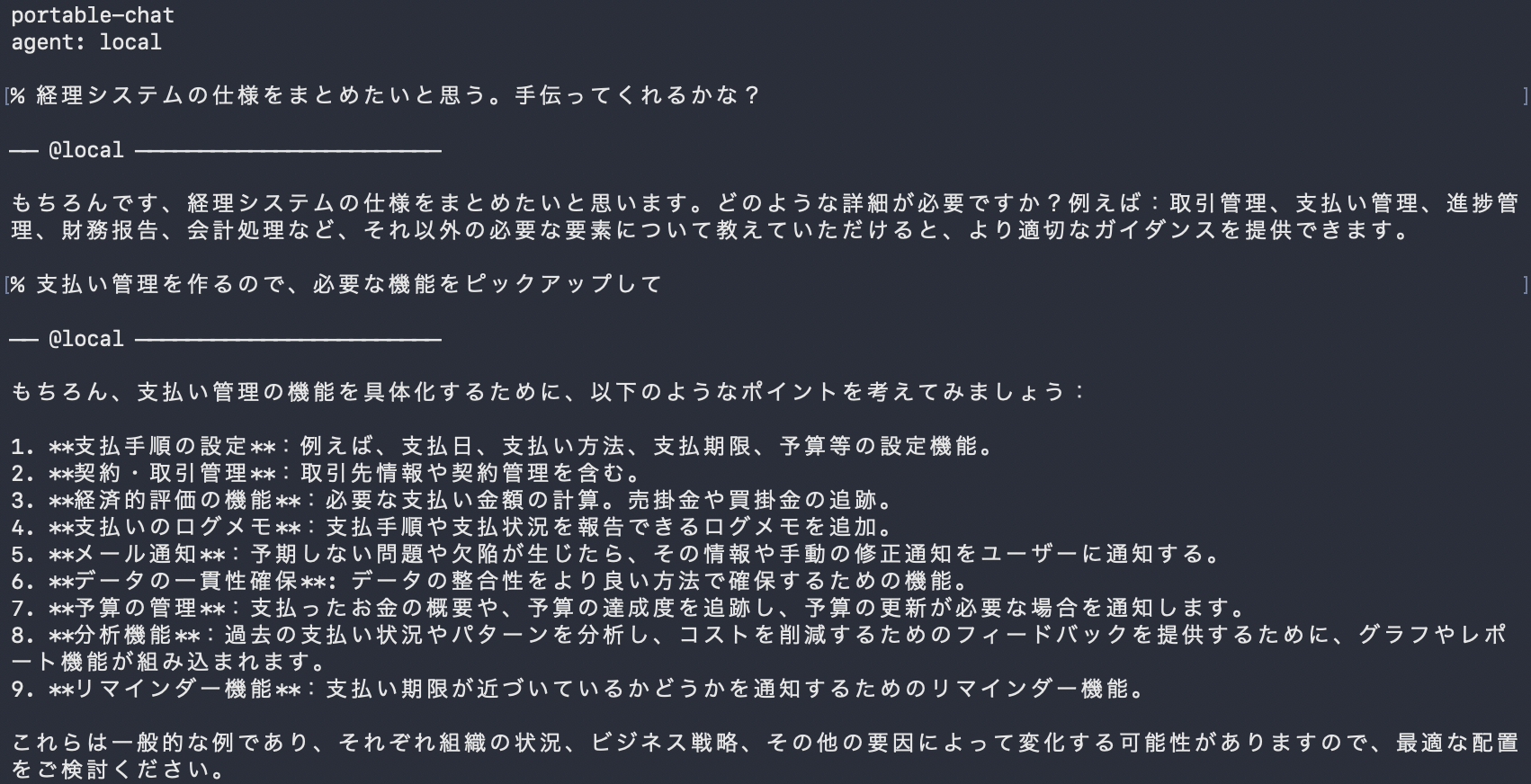
思考のスピードを止めないために。重いブラウザを立ち上げる必要はありません。 対話に特化した「portable-chat」は、開発者が最も使い慣れたターミナルから直接エージェントを呼び出します。探索的プロンプティングを通じてアイデアを発散させ、後続のオーケストレーションへ渡すためのコンテキストを素早く構築します。

portable-chat — terminal
Portable Agent Chat Terminal Interface

Extract the Signal from Noise

$ uv run portable-chat --agent local
... (Agentとの試行錯誤・要件の整理) ...
> :w specification.md
Saved 124 lines to specification.md

ひとつの仕様を作り上げるまでには、無数の試行錯誤と無駄な会話が含まれます。portable-chatの最大の価値は、会話のノイズを捨て、整理された純度の高い要件だけを :w コマンドで即座にファイル(Markdown)として書き出せることです。

  • ● オーバーヘッドゼロの高速な起動と応答
  • ● 会話のコンテキストから仕様書を直接ファイル抽出
  • ● 後続のオーケストレーション(v1)へシームレスに連携
Contact

お問い合わせ

Portable Agent に関するご質問や、生成AIエージェント環境への導入・検証のご相談など、お気軽にお送りください。